FTP Getter Professional 5.97.0.277
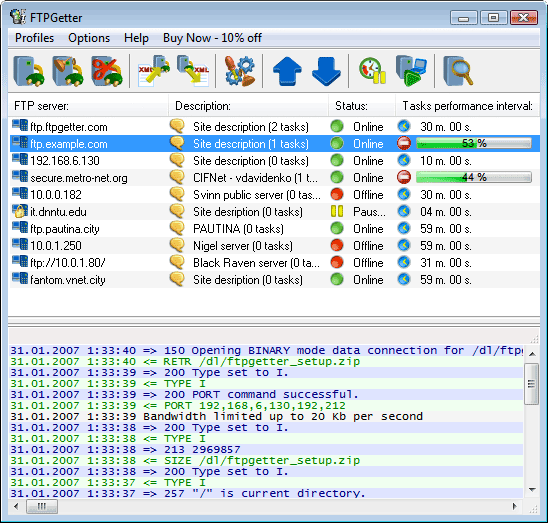
Save time on FTP/SFTP updates! Plan your uploads and automate the workflow. Schedule and automate file transfers with a centralized console. Let your computer move or synchronize information securely between home and office automatically according to the schedule!
- Terminal Emulator
FTPGetter Professional comes with a built-in terminal emulator, allowing you to connect and execute commands on a remote server via the command-line environment. Thanks to its terminal emulator, FTPGetter Professional users can access a variety of servers requiring the use of a terminal, perform file operations, navigate directory structures, and execute remote commands easily. - Automatic Synchronization
Monitor changes between the local and the remote PC and keep information up-to-date by synchronizing the contents between the two computers. FTPGetter detects new and updated files automatically, and uploads or downloads the changes according to the schedule. - Using Shell Scripting
Shell scripting is a powerful tool allowing to save time when a complex task must be performed. A few lines of code can initiate the process that will only take a couple of minutes to execute, saving you hours of time of doing the same task with brute force. For example, a large number of files can be downloaded from a server in a straightforward way by reading all files and folders one by one, and downloading each file separately. This takes time. A lot of time. However, a single shell command can make the server consolidate all files and folders into a single compressed archive, making it a snap to download. FTPGetter 3 Professional fully supports shell scripting. Read the article to find out about the benefits of using shell commands. - More…
Download
FTP Getter Professional 5.97.0.277