Awesome Miner Ultimate 10.0
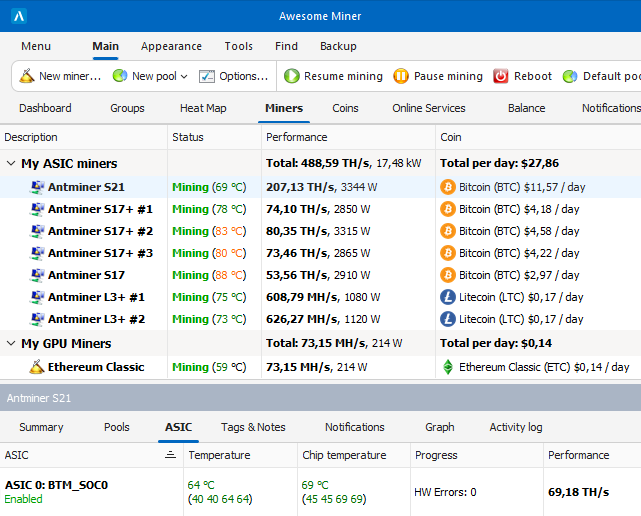
Complete solution to manage and monitor mining operations
- Notifications and Recovery
Use the predefined rules or define custom rules to take full control of the mining operations. Detection of high temperatures, slow mining progress, hanging miners and disconnected miners. Automatic restart of miners, with fully customizable triggers and actions. Define custom rules to automate tasks and setup schedules.
Notifications are displayed in the user interface and can also be sent by e-mail or web hooks. With a Cloud Services subscription also as Telegram App notifications and SMS messages.
- API
Use the HTTP API to interact with Awesome Miner from external applications and get access to monitoring information about the miners. Use the API to provision and control the mining via external applications.
Use the powerful built-in C# script engine to create customized triggers and actions. Develop custom C# scripts for monitoring and performing mining and pool operations.
- Dashboard & Mining history
The dashboard gives an overview of all running miners and their total performance, revenue, profit and power consumption.
View long-term mining history, generate charts and export CSV-data to Excel for even more powerful data processing and visualization.
- Organize miners
Organize your miners using miner groups to make management of larger number of miners easier. Visualize with heat maps to easier find miners with high temperature or low performance.
Define and assign tags to miners to filter and make it easier to identify properties of a miner.
- One click pool setup
Easy setup of popular mining pools without having to read page after page with setup instructions.
Get started with 2miners, Ethashpool, IceMining, Mining Dutch, Nanopool, Zergpool, Zpool, or any of the other pools.
- Secure On-premise solution
Awesome Miner runs on your infrastructure and on your network. Your important mining operations will not depend on any external services.
The software is digitally signed and has built enough trust to automatically be accepted by the Microsoft SmartScreen filter.
Templates
Use templates to apply a predefined configuration to one or many miners in a single operation.Balance monitoring
Monitor your assets using the Coin wallet balance feature and the Pool balance feature for the most popular mining pools.
Download
Awesome Miner Ultimate 10.0